.svg.png)
CAD integration
Engineering data from Solidworks, Inventor and other CAD systems directly searchable.
At its core, KoAssist is a retrieval system: documents become knowledge building blocks, every question becomes a targeted search, and the answer is built from the most relevant sources. Four steps, each transparent.
Four steps, four views from a real workspace. Anonymised, otherwise untouched.
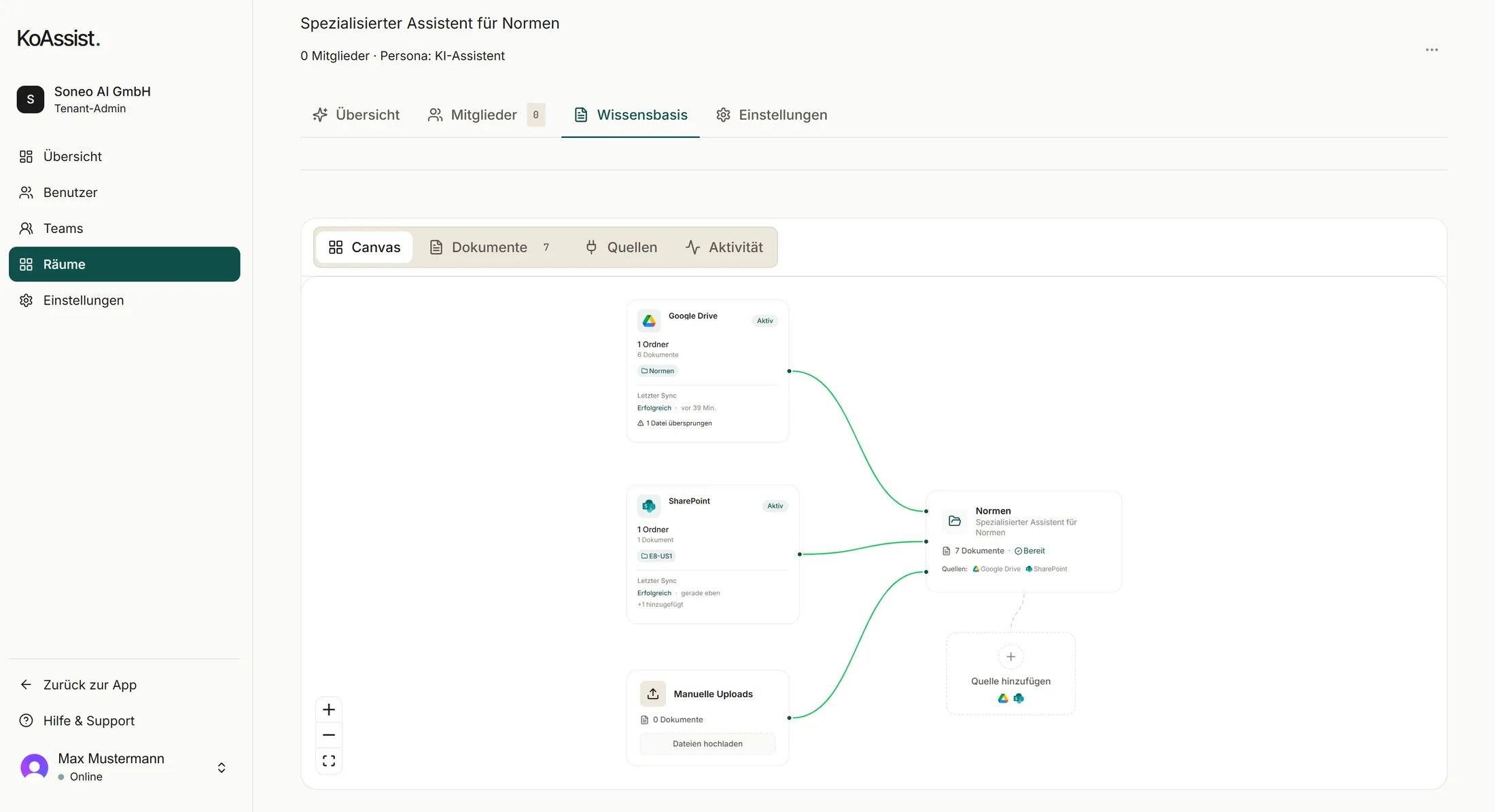
Google Drive, SharePoint or a direct upload feed a room. After every run you see what was ingested and what was skipped, including why.
Standards, specs and project documents are ingested and broken into semantic building blocks: small knowledge units that can be searched precisely later. OCR for scanned PDFs is built in.
The question is converted into a semantic representation. KoAssist doesn't search for exact keywords but for meaning: technical terms, synonyms and rephrased variants are all considered.
From the entire knowledge base, the five to fifteen most relevant passages are retrieved, ranked by semantic similarity to the question. These sources form the basis for the answer.
The answer is formulated from the retrieved passages, with every statement anchored in a specific source (file, page). If the sources don't provide a clear answer, that is reported transparently instead of guessed.
Engineering data from Solidworks, Inventor and other CAD systems directly searchable.
Bills of materials, change statuses and approvals from Teamcenter, Windchill and other PLM systems.
Bring targeted email conversations into the knowledge space. No blanket mailbox connection, only relevant threads.
KoAssist fully in English, for international engineering teams.
Analyze drawings, automatically identify reuse potential.
Support for additional AI models, including local inference for maximum data sovereignty.
Simplified documentation of technical decisions.
The tool drafts, the engineer reviews and approves.
Automatically check and document technical requirements.
Understand your data landscape, clarify integrations.
Documents are indexed, knowledge base prepared.
3-5 engineers test, feedback is incorporated.
Scaled to the full department.
Understand your data landscape, clarify integrations.
Documents are indexed, knowledge base prepared.
3-5 engineers test, feedback is incorporated.
Scaled to the full department.
German and English by default. Additional languages are technically possible and configured on request. Answers appear in the language of the question.
Up to 10,000 pages on the Solo plan, up to 75,000 pages on the Department plan, up to 250,000 pages on the Plant plan. Larger document bases on the Enterprise tier on request. Indexing time scales linearly: roughly 4 minutes per 100 pages of standard text.
KoAssist works on a snapshot of the document base that is regularly re-indexed. The update frequency is configurable: daily, weekly or on change via webhook. Real-time indexing is under development.
Scanned PDFs are processed via OCR (Optical Character Recognition), with German and English text recognition built in. Password-protected PDFs must be decrypted beforehand. KoAssist does not bypass encryption.
Yes. Every answer can be copied with its linked sources or exported as a small document. A full conversation history is available per user and can be downloaded from the system.
Traditional search finds documents that contain a keyword. KoAssist finds the specific passage that answers a question, summarizes it and cites the source with file and page. It also understands synonyms and technical terms, which pure keyword search cannot do.